
Download TweetFavy – Twitter Growth, Automated Likes & Free Promotion Tool
Overview
TweetFavy is a growth‑hacking platform built specifically for Twitter marketers, entrepreneurs, and anyone who wants to increase their online visibility without spending countless hours scrolling through timelines. The core idea is simple yet powerful: you supply a list of keywords that describe your niche, product, or service, and TweetFavy spends the day searching Twitter for the most relevant conversations. When it finds a tweet that matches your criteria, the tool automatically “likes” it using your own account.
Those likes appear in the tweet author’s notifications, instantly putting your profile in front of a potentially interested audience. In practice, each liked tweet becomes a subtle, non‑spammy invitation for the author to check out your profile, click your link, and become a new follower or customer. The service works 24/7, is fully automated after the initial setup, and integrates directly with your existing Twitter account through a secure OAuth connection.
Whether you’re a small‑business owner looking to drive traffic to a landing page, a content creator hoping to grow a personal brand, or a digital agency managing multiple client accounts, TweetFavy promises a “set‑and‑forget” approach to Twitter outreach. The platform markets itself as a free‑to‑try, secure, and continuously updated tool that respects Twitter’s rate limits and community guidelines, making it a low‑risk addition to any social‑media toolkit.
Key Features & Benefits
- Keyword‑Based Targeting: Input up to 20 keywords that reflect your niche, product, or service, and let the algorithm find the most relevant tweets.
- Automated Liking Engine: The system automatically likes matching tweets from your account, generating organic exposure.
- Real‑Time Notification Alerts: You receive instant alerts when a tweet is liked, enabling quick follow‑up if desired.
- Safe OAuth Integration: Connect your Twitter account securely without sharing passwords; all actions are performed under your credentials.
- Daily Usage Limits: Built‑in safeguards respect Twitter’s API limits to prevent account suspension.
- Multi‑Account Support: Manage several Twitter profiles from a single dashboard – perfect for agencies.
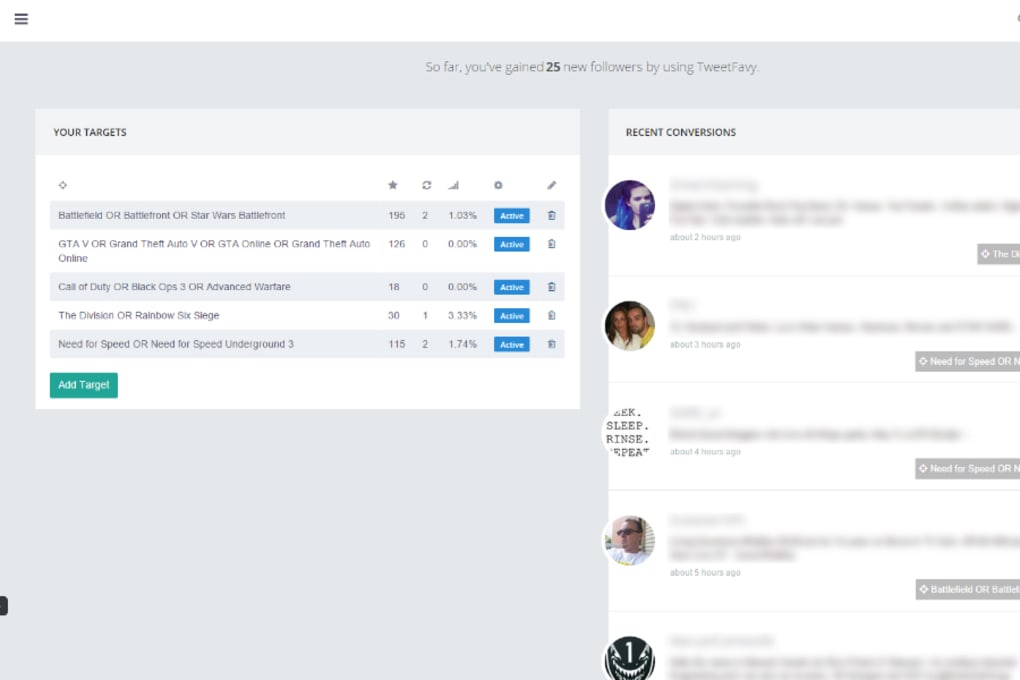
- Analytics Dashboard: Track the number of likes, new followers, and link clicks generated by the tool.
- Custom Scheduling: Choose the time windows when the bot should be active (e.g., business hours, peak engagement times).
- Free Trial & Affordable Plans: Start with a 7‑day free trial; paid plans start at $9.99 per month for unlimited likes.
- Regular Updates & Support: The development team pushes weekly updates to improve accuracy and adds new features based on user feedback.
These features combine to create a seamless, low‑effort growth loop. By automatically engaging with users already talking about topics you care about, TweetFavy positions your brand as a relevant participant rather than an intrusive marketer. The analytics give you measurable ROI, while the scheduling and multi‑account capabilities make the tool flexible enough for both solo entrepreneurs and larger teams. Because the platform respects Twitter’s community standards, you avoid the typical pitfalls of aggressive automation, such as rapid follow/unfollow cycles or spammy direct messages.
Installation & Usage Instructions
Step‑by‑Step Setup
- Visit the Official Site: Navigate to tweetfavy.com and click the “Get Started” button.
- Create an Account: Register using your email address. A verification email will be sent; confirm it to activate your account.
- Connect Your Twitter Account: After logging in, click “Connect Twitter.” You will be redirected to Twitter’s OAuth page where you authorize TweetFavy to like tweets on your behalf. No password is stored; only an access token is used.
- Define Your Keywords: In the dashboard, locate the “Keyword Manager.” Enter up to 20 keywords or phrases separated by commas (e.g., “organic coffee, fair‑trade, espresso”). You can also assign a weight to each keyword to prioritize certain terms.
- Set Your Preferences: Choose the daily like limit (e.g., 50, 100, 200), preferred time zones, and whether you want to receive email notifications for each like.
- Start the Bot: Click “Activate.” TweetFavy will begin scanning Twitter in real time, automatically liking tweets that match your criteria.
- Monitor Results: Use the built‑in analytics tab to view the number of likes, new followers gained, and any link clicks tracked via UTM parameters.
- Fine‑Tune Keywords: After a few days, review the “Top Engaged Tweets” section. If certain keywords are generating low‑quality likes, adjust or replace them.
For advanced users, TweetFavy also offers an API key that can be integrated into custom scripts or third‑party CRM tools, allowing you to trigger likes programmatically based on external events. The platform’s documentation provides detailed examples for both JavaScript and Python developers.
Overall, the installation process takes less than ten minutes, and the interface is intuitive enough that non‑technical users can start seeing results within the first 24 hours. The free trial gives you access to all premium features, so you can fully evaluate the impact before committing to a paid plan.
Compatibility, Pros & Cons
Operating System & Browser Support
TweetFavy is a web‑based SaaS solution, which means it runs on any modern operating system that can access a browser with JavaScript enabled. Tested environments include:
- Windows 10/11 (Chrome, Edge, Firefox)
- macOS Monterey and later (Safari, Chrome, Firefox)
- Linux distributions (Chrome, Firefox)
- iOS 14+ (Safari, Chrome) – mobile‑optimized dashboard
- Android 9+ (Chrome, Firefox) – responsive design
Because all actions are performed via the Twitter API, there is no need for a desktop client or additional software installations. The only requirement is a stable internet connection and a Twitter account with standard posting privileges.
Pros
- Automated Outreach: Saves hours of manual searching and liking.
- Targeted Engagement: Likes are only placed on tweets relevant to your niche, increasing conversion likelihood.
- Low Risk: Uses official OAuth and respects Twitter rate limits, reducing suspension risk.
- Scalable: Handles multiple accounts from a single dashboard.
- Insightful Analytics: Clear metrics on followers, likes, and traffic.
- Free Trial: Allows testing without financial commitment.
Cons
- Limited Interaction Types: Currently only automates “likes,” not retweets or replies.
- Keyword Dependency: Success hinges on well‑chosen keywords; poor selection can yield irrelevant likes.
- Monthly Cost: Advanced plans start at $9.99/month, which may be a barrier for very small budgets.
- Potential Saturation: High competition for popular keywords may reduce the uniqueness of engagement.
- No Direct Messaging: Follow‑up must be done manually after the like notification.
Despite these minor drawbacks, the overall value proposition remains strong for most users seeking a hands‑free method to increase Twitter visibility.
Frequently Asked Questions
Is TweetFavy safe for my Twitter account?
Yes. TweetFavy uses Twitter’s official OAuth authentication, which means your password never leaves Twitter’s secure servers. The tool also adheres to Twitter’s API rate limits, minimizing the risk of temporary or permanent suspension.Can I use TweetFavy on multiple Twitter accounts?
Absolutely. The dashboard supports adding and managing several accounts under one subscription. This is especially useful for agencies or users who run both personal and business profiles.What happens if I exceed the daily like limit?
TweetFavy will pause further activity for the day and resume the next 24‑hour cycle. You can adjust the limit in the settings to match your comfort level.Do I need any technical knowledge to set up TweetFavy?
No. The platform is designed for non‑technical users. The step‑by‑step wizard guides you through account connection, keyword entry, and scheduling without requiring code.Can I track traffic from the likes to my website?
Yes. By adding UTM parameters to the URLs you share in your profile or tweets, the analytics tab will show how many clicks originated from the automated likes.Conclusion & Call to Action
TweetFavy bridges the gap between manual Twitter engagement and full‑scale automation, delivering a secure, keyword‑driven approach to growing your follower base and driving traffic. Its intuitive dashboard, real‑time notifications, and detailed analytics make it a valuable addition for anyone serious about leveraging Twitter as a marketing channel. While the tool currently focuses on automated likes, the low‑risk nature and multi‑account support provide a solid foundation for future feature expansions such as retweets or scheduled replies. If you’re looking for a “set‑and‑forget” solution that respects Twitter’s community guidelines and offers measurable results, the free 7‑day trial is the perfect way to test the waters.
Ready to boost your Twitter presence? Click the button below to start your free trial, set your keywords, and watch TweetFavy do the heavy lifting for you.
TweetFavy transformed our Twitter outreach. The automated likes generated a steady stream of new followers and the analytics helped us refine our keyword strategy for even better results.



.png)



